
Any Old PC Will Be Faster Than a Macbook
- Peter
- Apr 26, 2024
- 6 min read
Updated: Feb 20, 2025
I mentioned to some people at my workplace that I was considering building a Linux PC so that I could have the fastest possible machine to work on, and one person made the interesting comment that any old PC would be faster than a Mac laptop.
I found this advice intriguing because the M-series chips do have a reputation for being extremely fast, but on the other hand the absolute highest-spec PCs parts generally aren't available in laptop form factor. So does Apple actually sell a slim little laptop that can go toe-to-toe with a massive PC tower?
Acquiring Any Old PC
Because I had given away my last PC tower around 4 years ago and have been using laptops exclusively since, I actually didn't have any PC parts at all to make comparisons with the M2 Macbook provided by work, so this question posed by my work colleague became a useful starting point for me to begin my PC-building - I quite literally bought an old PC off facebook marketplace for $250AUD (roughly $160USD) and installed Linux on it.
I think I got pretty good value for money but the specs are very modest, with only 8GB of RAM and a quad-core AMD CPU with builtin graphics.
I also decided to upgrade the storage since the seller only had a 250GB SATA3 SSD in the tower and I wanted to preserve the copy of windows on that drive in case I wanted to boot into windows at some point in the future. I was surprised to learn how cheap it is to get fast storage on a PC - for just $165AUD I bought one of the top performing Gen4 M.2 drives, a 1TB WD SN850X, which gives me the same storage capacity as the work Mac, but very close to the maximum speeds possible on PCIe 4. I haven't directly compared the storage performance of the Mac vs the SN850X, but in theory the Mac should be better than the current PC configuration because the 1TB M2 Macbooks were rated to around 6GB/s read speeds [CITATION NEEDED] and even though the SN850X is advertised as capable of up to 7.3GB/s read speeds, the PC's A320M-H motherboard only has PCIe 3.0 lanes available so the SN850X will max out at 4GB/s transfer speeds on its four 1GB/s lanes.
Benchmarking
I didn't end up finding any off-the-shelf software I could use to measure performance of my employer's various work tools, so I ended up building something custom which automates a bunch of the environment setup for me and makes it easy to store benchmarking results for different machine configurations for future analysis.
Although it doesn't yet measure everything I mentioned in the previous post, it measures enough that I can start to get a picture for how the M2 Macbook Pro stacks up against the old PC.
Git Status / Git Log

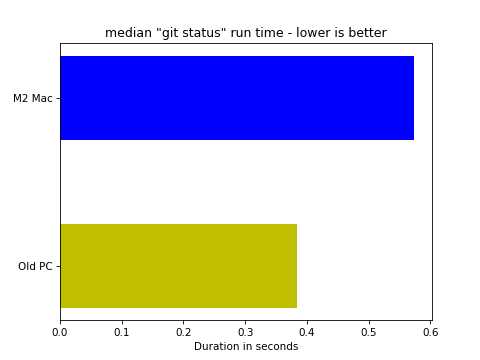

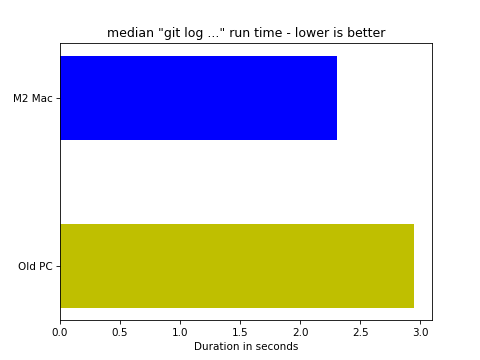
The first two benchmarks are measurements of how long each device takes to execute `git status` and `git log -20 --graph --format=...` in the workplace main monorepo. For these two benchmarks, I executed the 'git ...' commands at least 9 times each (plus a couple of extra runs at the start for warm-up).
For `git status`, the Mac had a median execution time of 0.57s while the PC was 1.5x faster and had a median execution time of just 0.38s.
For `git log`, the Mac had a median execution time of about 2.3s but this time the PC's median execution was 1.3x slower at 2.95s.
Mypy

This benchmark uses a wrapper script to run mypy over the corporate monorepo, but it's worthwhile noting that due to a buggy plugin we are using the mypy cache must be disabled. This means the execution time is always for a full scan of our entire codebase.
The median execution time on the M2 Mac was 3m18s, while the PC's median execution time was substantially slow at 8m22s (2.5x slower).
Pytest - Run a single test

This benchmark measures the amount of time required to run a single unit test in the corporate monorepo. This benchmark is important because most of my development work is done by modifying code and then re-running the related unit test to check whether it worked. Normally I want to be able to run a test in <1s so that I can iterate quickly.
Unfortunately for my productivity, in this massive monorepo I haven't been able to run any unit test in less than 15 seconds. The median execution time on Mac is 25s and the PC is even worse at 41s (1.6x slower).
Pytest - Run an empty test

This benchmark measures the time to execute a single empty unit test - it's essentially a measure of our unit test testbed startup time.
It would appear the testbed is very expensive indeed, as the median execution time is 27s on the Mac and 47s on the PC (1.8x slower than the Mac). The good news here is that if I can improve the testbed performance, then it should improve every test in the monorepo.
Ripgrep

For measuring ripgrep performance, I ran compiled a small list of search terms, ran "rg $search_term" for each search term on each device. I wanted to avoid the possibility that a search term which performs poorly on one device and spoils its results, so I found the two worst-performing search terms for each device and removed all device benchmarks for those terms.
The median execution time for one search on the Mac was 3.4s which was no match for the PC where the median execution time was just 0.74s per search (4.5x faster).
Update - 5/5/2024: It turns out my ripgrep benchmark wasn't working 100% correctly on linux - it was also searching the 1.5GB python virtualenv due to a missing .gitignore entry. I fixed the bug, made sure it wasn't occuring on the Mac, and re-ran the benchmark:

My apologies for the inverted colours, but this is now a more accurate representation for the ripgrep performance between the two systems. The M2 Mac's median execution time was 3.3s, while the old PC's median was just 0.5s, making the PC 6.5x faster.
Results Analysis
Right off the bat I am incredibly surprised by some of these results. My M2 Mac has 3x as many CPU cores as the old AMD 3200G in the PC, and according to cpubenchmark.net not only does it have 250% better multi-threaded CPU performance (26,320 CPUMark points vs 7,136 for the 3200G), it also has 80% better single-threaded performance (4,117 CPUMark points vs 2207 for the 3200G).
If we assume that most of the benchmark results are primarily limited by raw CPU speed then most of the benchmarks appear to roughly validate the cpubenchmark.net CPU single-thread scores - the Mac's "git log", empty test, unit test, and mypy scores are 1.3x, 1.8x, 1.6x, and 2.5x (respectively) better than the old PC. The logical follow-up here would be to upgrade the PC's CPU and see how much the scores can be improved. I could also attempt to overclock the PC to get it closer to Mac speeds, but this would be a pretty pointless exercise on the 3200G when I could get much better performance at stock speeds from a cheap mid-tier AM4 CPU like the 5700X.
It should also be noted that the longest-running benchmark, mypy, is very memory-intensive and could be limited by total memory capacity (only 6GB on the PC after 2GB of system memory is reserved for the integrated GPU), or it might also be limited by memory bandwidth as mypy navigates large interconnected data structures that are stored across a large memory space. It is would be worthwhile to test increasing the PC memory capacity, increase memory bandwidth, reduce memory latency, or increase on-CPU cache capacity. I honestly didn't expect such a low-spec PC to win any of these benchmarks so, but it probably makes sense that it is "git status" and "ripgrep" where it is winning as these two benchmarks are very disk-intensive and it's possible that Linux filesystems and/or the SN850X drive is helping the PC to pull out in front here. A good follow-up would be to re-run the benchmarks on Mac using a ramdisk to try and eliminate disk performance as a performance inhibitor.


Comments