
Real CPU Cooling
- Peter
- Sep 23, 2024
- 2 min read
Last week I finally got around to installing a "real" CPU cooler on the PC. When I first installed the 5700X I didn't have the cooler mounting brackets for the motherboard so I had to continue using the AMD Wraith Stealth cooler that had been installed on the 3200G.
I suspected that the Wraith cooler was hindering performance due to the way it pulls hot air down toward the motherboard and disperses it in all four directions away from the CPU - in other words, towards the closest RAM module and also the M.2 SSD. In contrast, the Contact 9 SE cooler I bought to use on the 5700X is designed to send hot air from the radiator towards the chassis rear exhaust fan so that heat is quickly removed from the chassis instead of being circulated around to other components.
I don't yet have a way to measure RAM temperatures, but I do have working CPU and SSD temperature sensors so I came up with the following hypothesis to compare performance before and after the cooler upgrade:
Upgrading to a larger cooler will help reduce CPU temperatures.
Upgrading to a larger cooler won't improve benchmark performance in typical ambient temperatures (23-25°C) because my workload is primarily single-threaded and can't generate enough heat to cause thermal throttling.
Upgrading to the new cooler will help reduce SSD temperatures because the new cooler isn't dumping 25% of the hot exhaust towards the SSD.
I also suspect that I can achieve slightly better RAM overclock speeds with less hot air being directed towards the left-most RAM module, but I don't have a way to measure RAM temperatures or quickly compare overclock configurations so cannot test this easily.
These benchmarks were run on the default BIOS settings for the 5700X (nothing overclocked).
Results
Temperatures

As expected, swapping to the bigger cooler helped to reduce CPU temperatures by around 10°C which is a nice improvement - the CPU now doesn't go over 70°C while running the single-threaded mypy benchmark.
Surprisingly, the SSD temperatures were essentially the same for the two coolers with maybe a 1°C difference between them. Either the hot air from the Wraith Stealth wasn't actually reaching the SSD, or it wasn't making a real difference to the SSD since it has its own heatsink.
Benchmark Performance

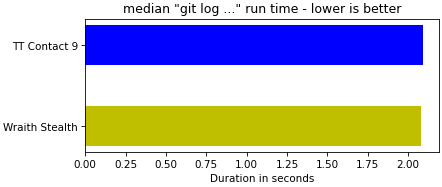


As expected, the CPU hadn't been throttling during most benchhmarks and so there was no difference for the git commands or mypy (less than 0.5% difference). I was pleasantly surprised however to note that the ripgrep benchmark improved by 2.3% even though it only runs for 0.34s. This is a little surprising - that the CPU is able to increase temperature enough to start thermal-throttling so quickly. I suspect what's actually happening is that because the benchmarks are executed immediately after each other, the temperature for the ripgrep benchmark is reached during the previous benchmark.
Conclusion
The CPU cooler upgrade is clearly better for CPU temperatures and appears to have improved ripgrep performance a little as well (although the PC is already a long way ahead on this benchmark anyway). SSD temperatures were unaffected by the upgrade. This is also one less variable to compare when I move to a larger chassis.


Comments