
BCLK Overclocking Attempt 2
- Peter
- Aug 28, 2024
- 5 min read
Although my previous attempt at BCLK overclocking was a failure, I wanted to give it another go since I had heard other people were successfully running configurations with small increases to their BCLK.
My main hypothesis for this experiment was that there was a hard limit for the BCLK where the motherboard would disable core boost features and that if I increased BCLK to just inside that limit then I might be able to increase maximum clock speeds by 2-3%.
Increasing the BCLK also affects the CPU multiplier and memory frequency and again I wanted to ensure that those factors weren't interfering with my results my results so for each configuration with an increased BCLK I also attempted to set a matching underclock for the CPU multiplier and memory frequency such that they were as close as possible to stock speeds.
I ran my test suite again with the following configurations:
100MHz BCLK (stock)
101MHz BCLK
102MHz BCLK
103MHz BCLK
104MHz BCLK
105MHz BCLK
Core Boost BCLK Limit
Like in the previous experiment I measured the CPU's fastest core frequency during the mypy benchmark and was able to determine that maximum BCLK achievable without disabling core boost is 104MHz:

This time around we are seeing some measurable increases in core frequency for the 101-104MHz configurations in the 1-4% range corresponding with the BCLK increase. The maximum core speed improved from 4652MHz on the 100MHz BCLK to 4835MHz on the 104MHz configuration, which should translate to measurable performance improvements across all benchmarks.
Imperfect Core Boost
Unfortunately some configurations appear to have not performed consistently well across the duration of their benchmark runs: The 100MHz stock configuration had a maximum fastest-core frequency of 4652MHz and the average frequency during the run was 4648MHz (a -4MHz drop) across the three 4.5 minute runs of mypy_full. Likewise the 103MHz BCLK configuration had a maximum fastest-core frequency of 4790MHz and an average of 4789MHz (a drop of just -1MHz) across the three 4.5 minute runs.
The 102MHz configuration seems to have fared the worst, with a promising maximum of 4743MHz but an average of 4664MHz (-79MHz drop). The 104MHz BCLK configuration shows the most potential for high speeds, but struggled to maintain boost speeds, particularly at the start of the mypy benchmark runs. Its maximum speed was 4835MHz but the average was 4823MHz (-12MHz).
This situation might be a result of inadequate CPU cooling. I didn't have air conditioning turned on on the weekend while the benchmarks were running, and while some configurations enjoyed cool ambient temperatures of the early morning, others were run later in the heat of the day in a room that has a tendency to get hot in the afternoon sun. In the chart below we see the 102MHz configuration struggling at over 80°C, much hotter than even the 103MHz or 104MHz configurations:

If we use the SSD temperatures as an indication of ambient temperature, then it suggests that the 102MHz configuration had to run in temperatures 8°C hotter than the stock configuration, and the 103MHz configuration had the benefit of an ambient temperature 4°C lower than the 100MHz config.
The chart below shows the difference between the CPU temperature and SSD (ambient) temperature for each configuration, and how long (in seconds) the components remained at that temperature difference.
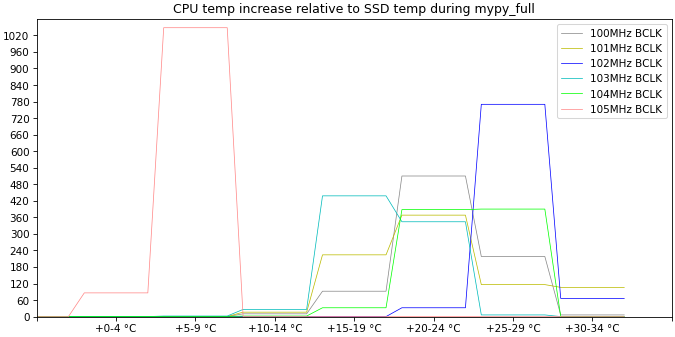
I'm not quite sure what to expect from the laws of thermodynamics, but the trend here is that as the SSD (ambient) temperature increases, the heatsink is less effective and the CPU is able to attain even greater temperature increase over the SSD. The average SSD temperature for the various configurations were:
103MHz: 38°C
100MHz: 41-42°C
101MHz: 44-45°C
104MHz: 47-48°C
102MHz: 49-50°C
Going forward it will be important to monitor SSD/ambient temperatures to ensure each configuration gets a fair evaluation.
Benchmark Results
Git status

In this benchmark we can see that the 105MHz BCLK configuration is noticeably slower (more than 30% slower than stock). I have removed the 105MHz configuration from subsequent charts since it is the same story for 105MHz on all benchmarks.
The 103MHz BCLK configuration is a nice 3.8% faster than stock which is slightly better than the 3.0% I would expect, but this might be due to limitations in the accuracy of the benchmark measurements - the fastest time was 0.33s and the slowest was 0.36s. Could this be explained by SSD temperatures? I don't think so - the 101MHz run had an SSD temperature of about 45°C and the 102MHz run had an ambient temperature of 50°C, but was 1% faster. The stock configuration ran at 42°C but seemed to have no issues. Unless there is a precise threshold somewhere between 43-44°C where the SSD performance deteriorates dramatically, then it seems we have to look elsewhere to explain this discrepancy.
Git log / Ripgrep


Git Log didn't seem to mind the hot temperatures and the 104MHz BCLK configuration was the fastest - 4.1% faster than stock. Ripgrep on the other hand did not seem to cope with the heat and so the 103MHz configuration was fastest at 4.2% improvement over stock.
Mypy / Pytest Single Test / Pytest Empty Test

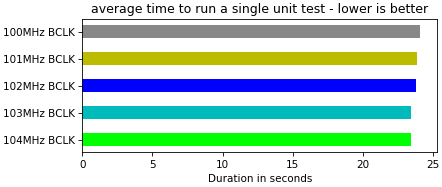

The python-based benchmarks showed a very curious pattern: regardless of ambient temperatures, the 103MHz and 104MHz were always 2.1-2.9% faster than stock (and never differed from each other by more than 0.2% on any benchmark.) There was a similar correlation with 101MHz and 102MHz, but it wasn't as consistent. This suggests that if I'm primarily interested in improving the Python benchmarks then a 103MHz BCLK is "as good as it gets".
Conclusion
I have been able to determine that 104MHz BCLK is the maximum possible BCLK overclock without disabling Core Boost features, and provides a consistent 2-4% improvement on benchmarks. However 103MHz BCLK provides similar improvements on the python benchmarks and is probably a safer alternative since BCLK overclocking overclocks nearly every component in the PC.
It remains to be seen how reliably a 103-104MHz BCLK overclock will combine with my a memory overclock configuration, and whether they will produce a result that is the sum of both their individual improvement amounts.
I also need to add a temperature check to my benchmark suite to warn me and stop collecting data when the SSD temperature goes over 40°C, since the CPU will likely get excessively hot during the run and corrupt the results.
I am also curious about the "Configuration 3" from my previous BCLK overclock attempt which had a 100MHz BCLK but CPU and memory increased by 10% - this configuration showed a 4% improvement on the mypy benchmark which can't be accounted for by the memory speed increase and seems to indicate that increasing the CPU base frequency from 3.4GHz to 3.7GHz provides some benefit even to a single-threaded benchmark.


Comments